





Planning a kitchen remodel usually starts with a mix of ideas, inspiration, and uncertainty. You might have a general direction in mind—new cabinets, updated countertops, or a different layout—but it’s difficult to know how those choices will come together in your actual space. Even small decisions can affect the overall look and feel, and without seeing them side by side, it’s easy to hesitate or second-guess.
This is where visual planning tools become useful. Instead of relying on your imagination alone, you can test different combinations, compare styles, and refine your ideas in a more structured way. Kitchen Magic’s visualizer helps simplify that early stage by giving you a clearer picture of what your kitchen could look like before you commit to any changes. In today’s blog, we’ll break down the most useful features of this tool and how they can help you plan your kitchen remodel more effectively. Keep reading to learn more!
What can I do with Kitchen Magic’s visualizer tool?
You can explore, test, and refine kitchen design ideas in a single place before committing to any changes.
Try layouts and styles without starting from scratch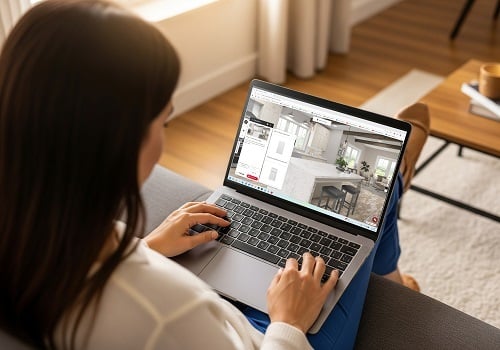
One of the most useful aspects of the tool is that you don’t need to start from nothing. You can choose from pre-built layouts or upload a photo of your current kitchen, which makes the process feel more grounded in reality from the start.
Experiment with full kitchen elements in one place
Kitchen design decisions rarely exist in isolation. Cabinets, countertops, backsplashes, flooring, and appliances all influence each other.
With this visualizer, you can adjust:
- Cabinet styles, colors, and finishes
- Countertop materials and edge profiles
- Backsplash height and pattern
- Flooring and wall colors and patterns
- Appliance selection
This makes it easier to catch combinations that don’t quite work before moving forward.
Make faster decisions with real-time updates
One of the biggest advantages of using a visualizer like this is the speed at which you can test your ideas. As soon as you make a change, you can immediately see how it affects the overall design.
This kind of instant feedback reduces hesitation and helps you move forward with your project. Instead of imagining outcomes, you’re reacting to something you can actually see.
Does the visualizer let me change cabinet colors and countertop materials?
Yes, you can quickly test different cabinet finishes and countertop materials to see how they look together.
Instantly test cabinet finishes and tones
Cabinets take up a large portion of visual space, so even small adjustments can completely change how a kitchen feels.
With this visualizer, you can: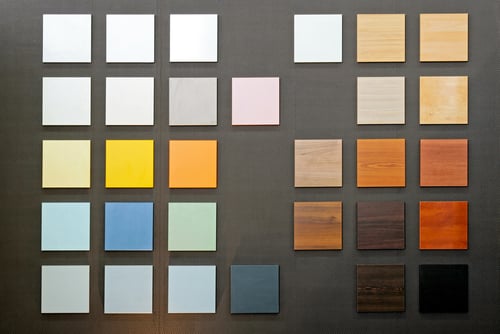
- Switch between light and dark cabinets
- Try warm, neutral, or cool tones
- Explore solid colors versus natural wood finishes
Compare countertop materials in context
Countertops aren’t just about appearance—they also play a role in durability and maintenance. Materials like quartz, granite, and laminate differ in how they handle wear over time.
Seeing these materials in context helps you:
- Understand how patterns interact with cabinets
- Evaluate contrast and visual balance
- Choose something that fits both style and daily use
See how materials work together as a system
One of the most practical benefits is being able to evaluate everything together. Instead of focusing on individual selections, you can see how cabinets, countertops, and backsplashes interact in a single view.
This reduces the risk of:
- Clashing tones or undertones
- Overly busy or competing patterns
- Flat or visually uninteresting designs
- Combinations that feel disconnected
Can I save multiple kitchen design ideas and compare them?
Yes, saving different versions is one of the most practical features of this tool.
You don’t have to settle on the first idea you create. Instead, you can develop a few different directions and refine them over time as your preferences become clearer. One version might focus on lighter tones and a more open feel, while another explores darker cabinetry with stronger contrast, and another leans toward neutral finishes.
Seeing these variations makes it easier to understand what actually works in your space rather than relying on guesswork.
Compare designs based on real-life use
Looking at multiple options helps you evaluate more than just appearance. It becomes easier to notice how each design supports daily use.
You can compare things like:
- Counter space and prep areas
- Storage accessibility and layout
- Movement between key zones
- Overall balance between function and style
Another advantage is the ability to share your saved designs with others. Whether it’s your family members or professionals, getting a second opinion can help you catch details you might have missed and feel more confident about your direction.
How realistic are the designs from the visualizer (will my kitchen look like that)?
The designs are realistic enough to guide your decisions, but they won’t be an exact preview of your finished kitchen.
What the visualizer gets right
In most cases, the design tool gives you a very solid representation of how your kitchen will come together. The layout, proportions, and product styles are based on real options, so you’re not just looking at a generic mockup.
It’s especially helpful for understanding: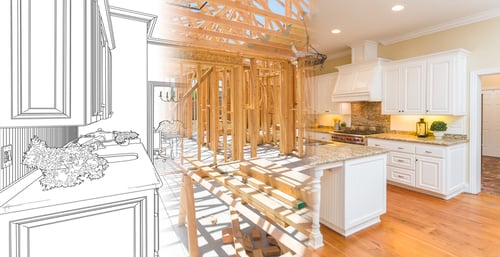
- How different finishes look next to each other
- Whether your kitchen will feel light, dark, warm, or high-contrast
- How the overall layout and spacing will function
Where things can look different in real life
That said, there are a few areas where the final result can differ slightly—and this is completely normal.
Lighting greatly affects how we see different hues. A color that looks warm and soft on your screen may seem brighter, cooler, or more muted in different lighting, like natural sunlight, light bulbs, or at different times of day. And the natural lighting of your specific kitchen space makes the most important difference as it is the space you will live in every day. This change in appearance can be explained by color theory.
Material texture is another difference. Screens can’t fully capture depth, grain, or reflectiveness, so surfaces like wood, stone, or textured finishes may feel a bit different in person.
It’s also important to keep in mind that this visualizer isn’t built to capture exact measurements or the unique conditions of your space. It can give you a strong visual direction, but the precise layout, spacing, and fit will always be finalized during real-world planning.
There are also small details that a visualizer doesn’t fully account for, like:
- Subtle color variations between batches of materials
- How finishes react to shadows and surrounding elements
- The overall feel of the space once everything is physically installed
So what should you expect overall?
The visualizer is best thought of as a helpful decision tool, not a final blueprint. It helps you get most of the way there by narrowing down your options and giving you a clear direction.
This is where it helps to remember that virtual design is only the first step in remodeling, and the final result depends on real materials, lighting, and accurate measurements.
How does a kitchen visualizer help you avoid costly mistakes?
By giving you a realistic digital rendering of your kitchen, you can test colors, materials, and layouts before committing to construction.
Using a digital design tool early in the planning process gives you a clear view of how colors, finishes, and materials will look together. Modern design tools let you explore your kitchen options and experiment with different styles and layouts, helping you reduce guesswork, avoid costly revisions, and make confident choices for your remodel.
Avoid choosing the wrong colors
Color is one of the easiest things to get wrong when you’re relying on imagination alone. Testing colors in a visualizer helps prevent:
- Overly dark or heavy-looking kitchens
- Washed-out or low-contrast designs
- Clashing undertones between surfaces
- Unintentionally making a space appear smaller or unbalanced instead of more spacious
Reduce material mismatches
Materials that look good individually don’t always work well together. A design tool allows you to test combinations ahead of time, helping reduce the likelihood of costly revisions later on. You can experiment with:
- Countertop and backsplash pairings
- Cabinet and flooring contrasts
- Appliance finishes versus surrounding surfaces
- Edge profiles and trim options
What are the 5 most useful features of Kitchen Magic’s visualizer?
The most useful features focus on helping you make clearer decisions during the early planning stage.
Key features that make planning easier
- Real-time design updates
- Customization
- Layout visualization tools
- Save functionality
- Photo upload for realistic previews
These features align closely with what you’d expect from one of the to home design apps and tools available, but with a more focused and beginner-friendly experience tailored to kitchen remodeling.
Which visualizer tool offers the best features for planning your kitchen?
At Kitchen Magic, we love helping homeowners fall in love with their kitchens again. That’s why we created our visualizer, which lets you explore layouts, cabinet styles, countertops, and finishes—all in a realistic digital preview. You can experiment, save your favorite ideas, and see which designs feel right for your space. And once you have a clear idea of your favorite layouts, colors, and finishes, you can reach out to our team to fully plan your next kitchen or bathroom remodel. We’ll help bring your vision to life with expert guidance, high-quality materials, and years of experience, making the process smooth, confident, and enjoyable.